Full-stack development
What Is the MERN Stack? How It Works and How to Learn It
How MongoDB, Express, React and Node.js work together, following one request through the code, plus when MERN is the right choice and how to learn it.
- Published
- Updated
- Reading time
- 7 min read
In this guide
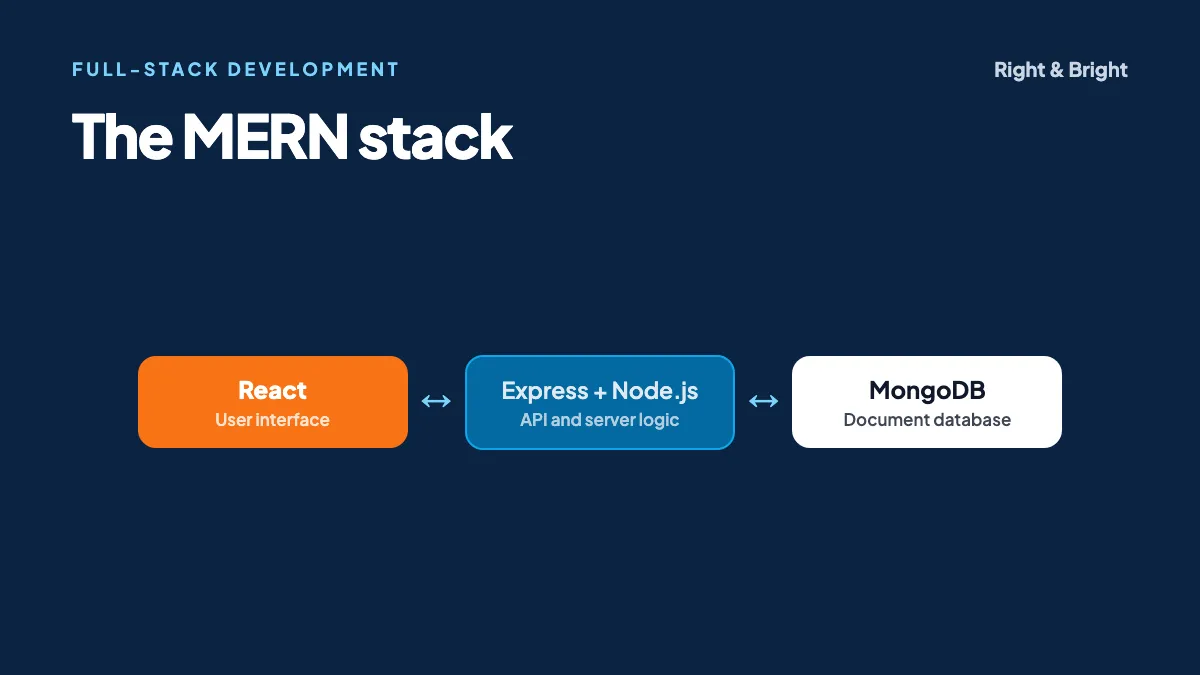
The MERN stack is a set of four JavaScript-based technologies for building full-stack web applications: MongoDB (database), Express (server framework), React (user interface) and Node.js (server runtime).
The appeal for a beginner is simple. You use one language from the button a person clicks all the way to the code that talks to the database, and data moves between those layers in the same JSON-like format. You still have a lot to learn, but you are not also switching languages every time you cross a layer.
This guide explains how the pieces fit together by following a single request through them, then covers when MERN is a good choice and how to learn it.
What does each part of MERN do?
MongoDB's overview describes MERN as a three-tier architecture: front end, application server and database.
| Technology | Tier | What it does |
|---|---|---|
| React | Front end | Builds the interface from reusable components in the browser |
| Express | Application | Routes HTTP requests to the right server code |
| Node.js | Application | Runs JavaScript on the server |
| MongoDB | Database | Stores data as JSON-like documents |
How does a request flow through the stack?
The browser's React code calls an API, Express routes the request to a handler on Node.js, the handler queries MongoDB, and the JSON result travels back for React to display.
Suppose a student opens a page listing courses:
- A React component loads and asks for data using fetch.
- The request reaches Node.js, where Express matches
GET /api/coursesto a handler. - The handler queries MongoDB, which returns matching documents.
- Express sends them back as JSON.
- React updates its state and re-renders the list.
The back end: an Express route
import express from 'express';

export function coursesRouter(db) {
  const router = express.Router();

  router.get('/', async (req, res, next) => {
    try {
      const limit = Math.min(Number(req.query.limit) || 20, 100);
      const courses = await db.collection('courses').find().limit(limit).toArray();
      res.json(courses);
    } catch (err) {
      next(err);
    }
  });

  return router;
}
Mount it with app.use('/api/courses', coursesRouter(db)). We ran this route with Express 4 against a stubbed database, checking that a normal request, a huge limit and an invalid limit all behave sensibly. The limit is capped because a client should not be able to ask for your whole collection. Passing db in as a parameter also makes the route easy to test.
The front end: a React component
import { useEffect, useState } from 'react';

export function CourseList() {
  const [courses, setCourses] = useState([]);
  const [error, setError] = useState(null);

  useEffect(() => {
    fetch('/api/courses')
      .then((res) => {
        if (!res.ok) throw new Error('Request failed');
        return res.json();
      })
      .then(setCourses)
      .catch(setError);
  }, []);

  if (error) return <p>Could not load courses.</p>;

  return (
    <ul>
      {courses.map((course) => (
        <li key={course._id}>{course.title}</li>
      ))}
    </ul>
  );
}
This uses the core ideas from React's own tutorial: components, state and rendering lists with a key. fetch does not reject on a 404 or 500 response, so the res.ok check matters. Forgetting it is a common beginner bug.
When starting a new React project, note that React recommends starting with a framework such as Next.js or React Router, and also explains how to start from scratch with a build tool like Vite. For learning the MERN separation of client and server, a plain Vite front end with an Express API keeps the two layers easy to see.
Working with MongoDB well
MongoDB's flexibility is useful, and it is also where beginners get into trouble. "No fixed schema" does not mean "no design".
- Design around how the app reads data. Data accessed together can often live in one document, whereas large or independently updated data may belong in its own collection.
- Add validation. MongoDB supports schema validation on the server, and Mongoose is a popular library for defining schemas in your code.
- Create indexes for your common queries. Without an index, MongoDB has to scan a whole collection, which gets slower as the data grows.
Security basics for a MERN app
Tutorials often skip this, so treat it as part of the project. The OWASP Top 10 is the standard list of web application risks, and Express publishes its own security best practices.
- Check permissions on the server. Hiding a button in React does not protect the API behind it.
- Validate all input on the server, including query parameters, as our limit example does.
- Hash passwords properly using a purpose-built algorithm. OWASP's password storage guidance explains which.
- Keep secrets out of the code and the browser. Anything in your React bundle can be read by anyone.
- Run a supported Node.js version. The Node.js project says production apps should use only LTS releases.
When is MERN a good choice?
In our opinion, MERN fits best when:
- You are building an interactive application, such as a dashboard, a marketplace or a booking tool.
- Your team already knows JavaScript.
- Your data varies in structure or changes shape often.
Consider something else when:
- Your data is highly relational, with many transactions across linked records. MongoDB does support transactions, but a relational database may be a more natural fit.
- Your site is mostly static content, where a full API and database may be more than you need.
- Your team specialises elsewhere, such as in Python. Team knowledge usually matters more than the stack's popularity.
What is the difference between MERN and MEAN?
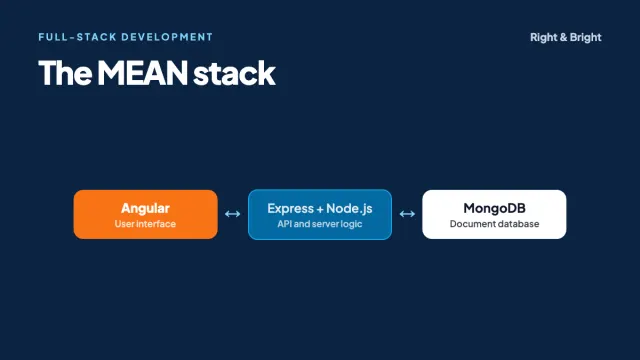
MERN and MEAN differ only in the front end: MERN uses React and MEAN uses Angular. MongoDB, Express and Node.js are the same in both, so back-end skills transfer directly.
Read our MEAN stack guide for the full comparison and advice on choosing.
How should you learn the MERN stack?
- HTML, CSS and JavaScript. Be comfortable with functions, arrays, objects, promises and async/await. Struggling with React is often really struggling with JavaScript.
- React: components, props, state, effects and routing.
- Node.js and Express: routes, middleware and building a REST API.
- MongoDB: documents, queries, indexes and data modelling.
- Connect them: build a complete app with sign-in.
- Test it. Write end-to-end tests, as shown in our introduction to Playwright.
- Deploy it, with a pipeline. Read how DevOps pipelines work and our cloud guide to see what that involves.
Project idea
Build a small appointment booker for a local clinic: people can sign in, see open slots and book one, and staff can manage the schedule. It requires authentication, permissions, validation and a real double-booking problem to solve. That gives you more to talk about in an interview than another to-do list does.
Right & Bright's 10-week, intermediate-level MERN Stack Development course covers React, Node.js, Express, MongoDB, REST APIs and deployment.
Frequently asked questions
Is MERN good for beginners?
It is a reasonable path if you already know some JavaScript, since you use one language throughout. Do not skip the fundamentals. Learning four technologies at once without them can be overwhelming.
Do I have to use MongoDB with React and Node?
No. React and Node.js work with any database, and many production apps pair them with PostgreSQL or MySQL. MERN is a popular combination and not a rule.
Is React a framework or a library?
React calls itself a library for web and native user interfaces. On its own, it does not include everything an app needs, such as routing, which is why React now recommends frameworks for many new apps.
How long does it take to learn MERN?
It depends on your background and practice time. Someone with JavaScript experience will move much faster than a complete beginner. Being able to build and deploy a small app by yourself is a better milestone than a date.
Should I learn TypeScript for MERN?
Learn JavaScript first, then add TypeScript. Types catch many mistakes as projects grow, and you will often see them in professional codebases.
Sources and further reading
- MongoDB: MERN Stack Explained
- React: Quick Start and Creating a React App
- Express: Production best practices: security
- OWASP: Top 10
- Node.js: Release schedule
MERN Stack Development
Build and deploy full-stack apps with a mentor
Our 10-week, intermediate-level course covers React, Node.js, Express, MongoDB, REST APIs and deployment. Sit in on a free demo class before you decide.
Related guides
Full-stack development
What Is the MEAN Stack? Angular, Node.js and How It Compares with MERN
The MEAN stack explained: MongoDB, Express, Angular and Node.js, with Angular code, a MEAN vs MERN comparison, common mistakes and a learning roadmap.
7 min read
Test automation
Playwright Testing: A Practical Guide for Beginners with TypeScript
Learn Playwright with TypeScript: setup, tested code examples, locators, auto-waiting, CI/CD, common mistakes and how it compares with Selenium.
7 min read
DevOps
What Is DevOps? Lifecycle, CI/CD, Tools and How to Get Started
DevOps explained: the lifecycle, CI/CD, infrastructure as code, containers, DORA metrics, AWS and Azure tools, common myths and a career roadmap.
7 min read